Have you just heard about how good WhatsApp truly is? Your next question right now may be about knowing how to install whatsapp on huawei phone or any other device. Billions of people are on WhatsApp now, and it is nice to see that you are in good company. WhatsApp is a great messaging tool to have in your arsenal. You can quickly send messages and make calls to another person in a matter of seconds. WhatsApp also has other features that you can use every day. This article recommends the following method to implement so that you can get WhatsApp quickly and easily.
Installation Guide: Downloading WhatsApp on Huawei Using AppGallery
Use Huawei AppGallery
You do not have to go anywhere else or download additional platforms to be able to get WhatsApp. Huawei has made sure that its users have everything that they need to have access to thousands of apps that can be used on their devices. Huawei has continued to innovate and make the lives of its customers easy by making modifications to the way they can download apps. In this case, it is uncomplicated to learn how to install whatsapp on huawei device. You have a preinstalled app known as AppGallery that serves as the storefront of various apps that you can put on your Huawei tablet or phone. Go through this app and see the vast number of options aside from WhatsApp that you can download and install.
Download WhatsApp
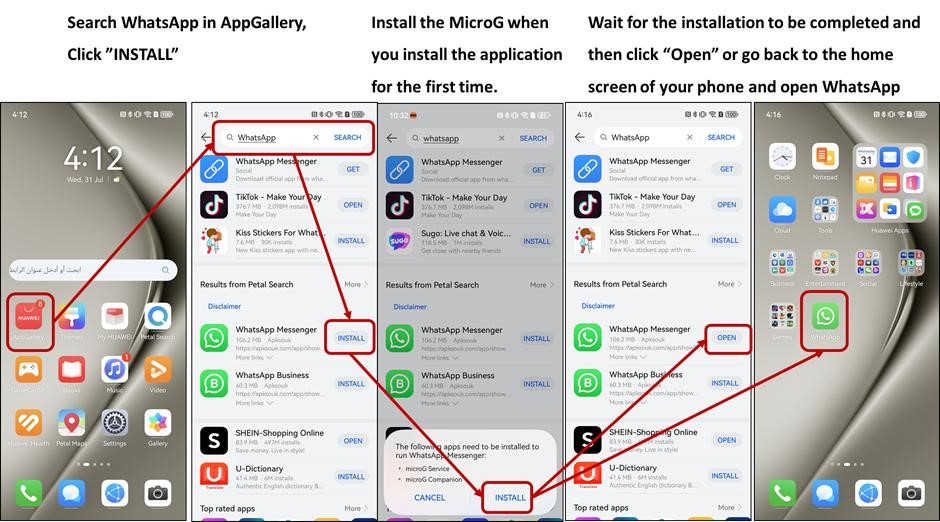
AppGallery is an easy interface to work with. By just scrolling on the screen, you can eventually find WhatsApp, which is a very popular app that Huawei users install. You can also use a search for it and type WhatsApp to see the rapid results. You will eventually see the WhatsApp Messenger icon with the word “Install” beside it. You can choose to install the app on your device. This is a straightforward step that will lead you to the next one.
Get microG
You will be prompted to install microG Service and microG Companion when you click “Install” next to WhatsApp Messenger. These other apps are necessary for WhatsApp to function. Thanks to this open-source framework, you will be able to use apps like WhatsApp on your Huawei device. What is great with the whole process of WhatsApp download is that the microG installation is integrated. You no longer have to go through another search in AppGallery to download microG. This is a practical approach that the Huawei developers took to make it simple for its users.
Start using WhatsApp
After the installation of WhatsApp and microG tools, you are now ready to open WhatsApp. You can go to your home screen and look for the WhatsApp icon. WhatsApp has features like chats and calls that allow you to connect to people anywhere and anytime. WhatsApp also has Groups that help you unite your team and assist you in having better communication with them. Channels are also available for use by any WhatsApp user. Meta AI is also integrated into the WhatsApp system, so you have access to it 24/7.

Conclusion
The method stated is the easiest path to choose to get WhatsApp on your Huawei device. Knowing how to install whatsapp on huawei quickly is the goal of the brand. It makes sure that users will be given with utmost importance when it comes to downloading apps such as WhatsApp on their devices. WhatsApp can generally help you connect to people and make communication better in a wider perspective. With all the features of WhatsApp, you can improve relationships with your family, friends, and even your team and co-workers.